Second shooter workflow
Two photographers. One day, in order.
Merging a second shooter's cards with yours usually means fixing clocks, renaming clashes and working out whose frame is whose. PhotoEngineer does it as the cards go in, so you cull one day in the order it happened.
Mac with Apple silicon · macOS 26
What goes wrong
Four headaches with a second card.
- The clocks disagree
- One camera is a minute fast, the other is still on summer time. Sort by capture time and the first kiss comes before the vows.
- The file names clash
- Both cameras start at DSC_0001. Copy them into one folder and one set overwrites the other, or Finder asks you a thousand times.
- Whose photo is it?
- Once they're mixed, you can't tell which frames are the second shooter's, for credits, for checking their work, or for paying them per image.
- Two piles to cull
- You cull your cards, then theirs, and keep jumping back to compare the same moment from two angles.
The workflow
Four steps, done at ingest.
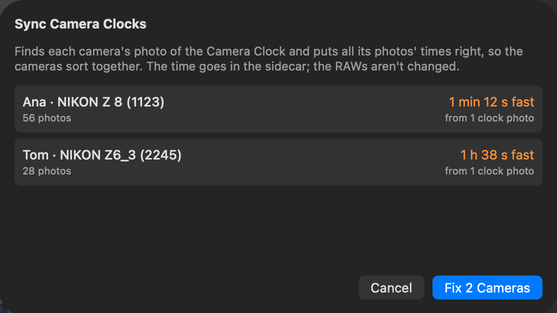
- Photograph the Camera Clock. At the end of the day, Tools › Camera Clock puts a QR code of your Mac's time on screen. Each camera takes one photo of it. No clock to read, nothing to type.
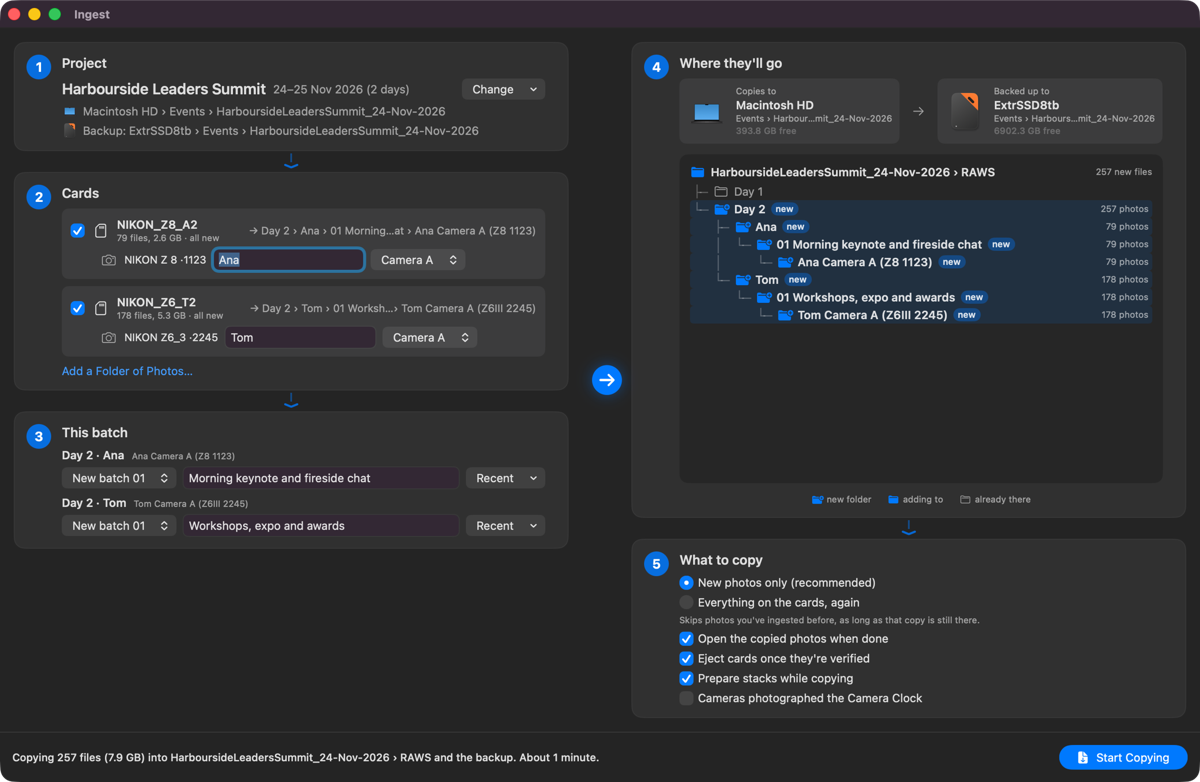
- Put both cards in. Each card has its own copier, so they copy side by side. The first time PhotoEngineer sees a camera it asks "Whose camera?", by the body's serial number, and remembers it next time.
- Tick "Cameras photographed the Camera Clock". PhotoEngineer finds the clock photo on each card, works out how far off each camera was, and corrects every capture time before anything is copied.
- Rename as it copies. A pattern like
{date}_{job}_{camera}_{seq:4}. The sequence numbers run in corrected capture-time order across both cards, so the two photographers' frames interleave, and a RAW and its JPEG share one number.
Then
Cull it as one day.
- Both angles side by side
- Open the day and the two photographers' frames of each moment sit next to each other in time order. Press V to compare two frames side by side.
- Events file themselves by photographer
- In an Event project each card goes into Day › Batch › Photographer › Camera by itself. A Wedding project puts each card in its own folder in the right wedding, named for whose camera it was (Card 1 - Ana, Card 2 - Tom). Either way the photographer is known.
- Bursts to the hundredth
- Sport mode shows the clock in hundredths of a second, so two cameras' bursts of the same moment interleave frame by frame.
- Selects without clashes
- Copy to Selects puts your picks from both photographers in one place. If two frames would share a name, one gets -A; nothing is overwritten.
- The awkward cameras
- A camera on another time zone, a summer-time change, a body whose battery died and reset itself to 2020. Sony bodies are told apart too, from the serial hidden in the maker notes.
- RAWs untouched
- The corrected time goes in each RAW's XMP sidecar, which Lightroom reads on import. The RAW files stay as shot.
A tip for the day itself
Make the clock photo the last frame.
Open the Camera Clock on your Mac and have your second shooter photograph it as the last shot before they hand you the card: at the venue if your laptop is with you, or when you get back. It takes two seconds and works even if they never set their camera's time. Just make sure the clock photo comes after the day's photos and before the camera's clock is changed.
Questions
The short answers.
How do I merge photos from a second shooter?
Sync the clocks, rename so files can't clash, keep track of whose camera each came from, then sort by capture time. PhotoEngineer does all four at ingest.
How do I sync two cameras' clocks after the shoot?
Each camera takes one photo of the Camera Clock's QR code. PhotoEngineer reads it on every card and corrects the times.
What if both cameras' files are called DSC_0001?
Rename at ingest with the camera or photographer in the name and a sequence number in capture-time order. Existing files are never overwritten.
How does it know whose camera it is?
By the body serial number. It asks once per camera and remembers.
More than two photographers?
Yes, any number of cameras and cards, over any number of days.
Can I still use Lightroom?
Yes. The corrected times, stars and tags are in the sidecars, which Lightroom reads when it imports.