For wedding photographers
Are your wedding photos really backed up?
There's no second go at a wedding. PhotoEngineer copies every card to your Mac and a backup drive, checks both copies against the card, and files each wedding by date and couple, all season long.
Mac with Apple silicon · macOS 26
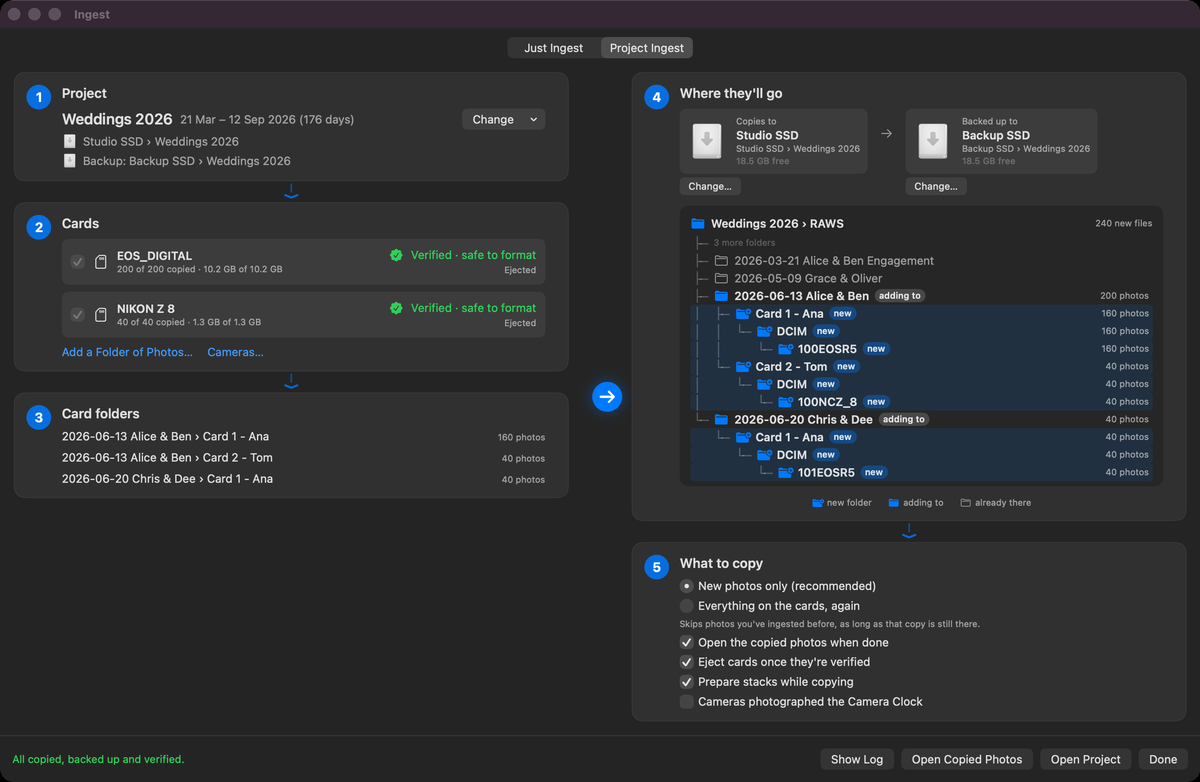
Keeping the day safe
Two copies, checked, before you format.
- Two drives, every time
- Every photo goes to your Mac and your backup drive as it's copied. Pick a backup on the same drive and PhotoEngineer warns you: if that drive fails, both copies go.
- Checked against the card
- Each copy is read back from the drive, not from memory, and compared with the card, byte for byte.
- "Safe to format" means it
- A card only says it once every photo is in both places and both copies match.
- Nothing twice, nothing missed
- Put the same card in again and only the new photos are copied, into that card's own folder. A drive full halfway through the reception? Plug in another and carry on: the project shows every drive together.
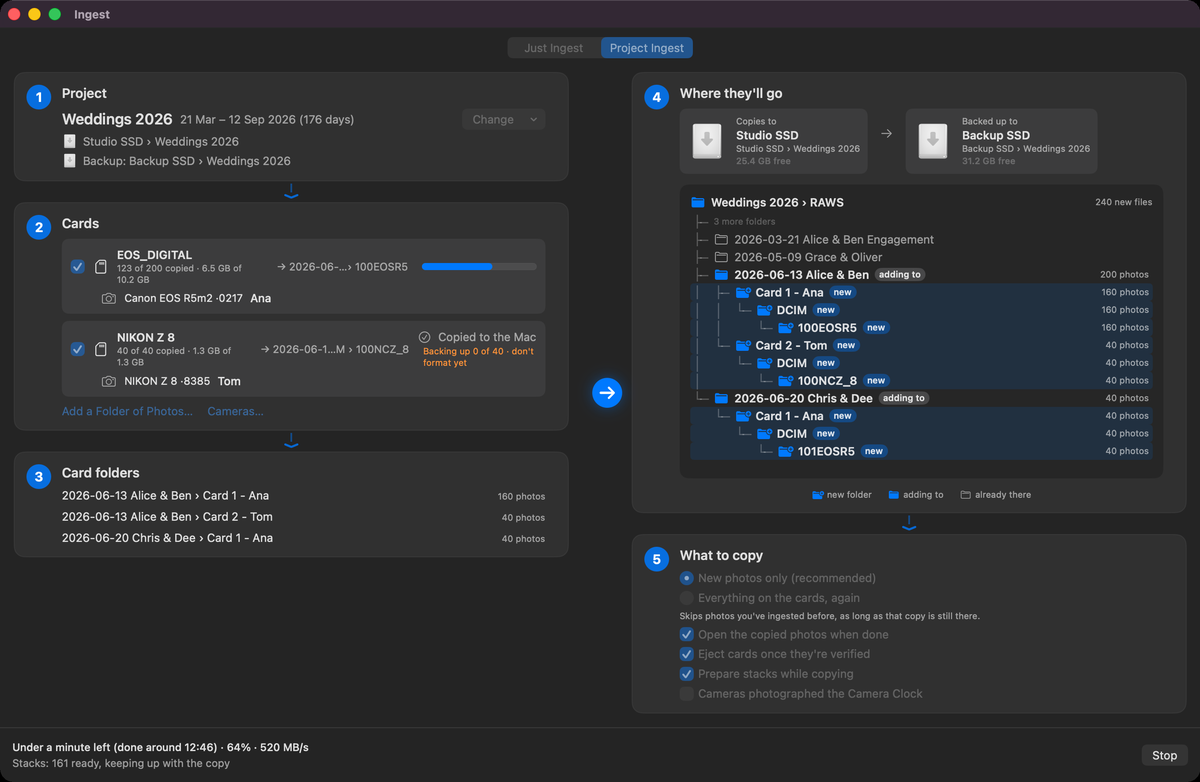
Copied to the Mac isn't enough. Until the backup is done and checked, the card says don't format yet.
Wedding projects
One project for the whole season.
File › New Wedding Project, or the tile on PhotoEngineer's Home.
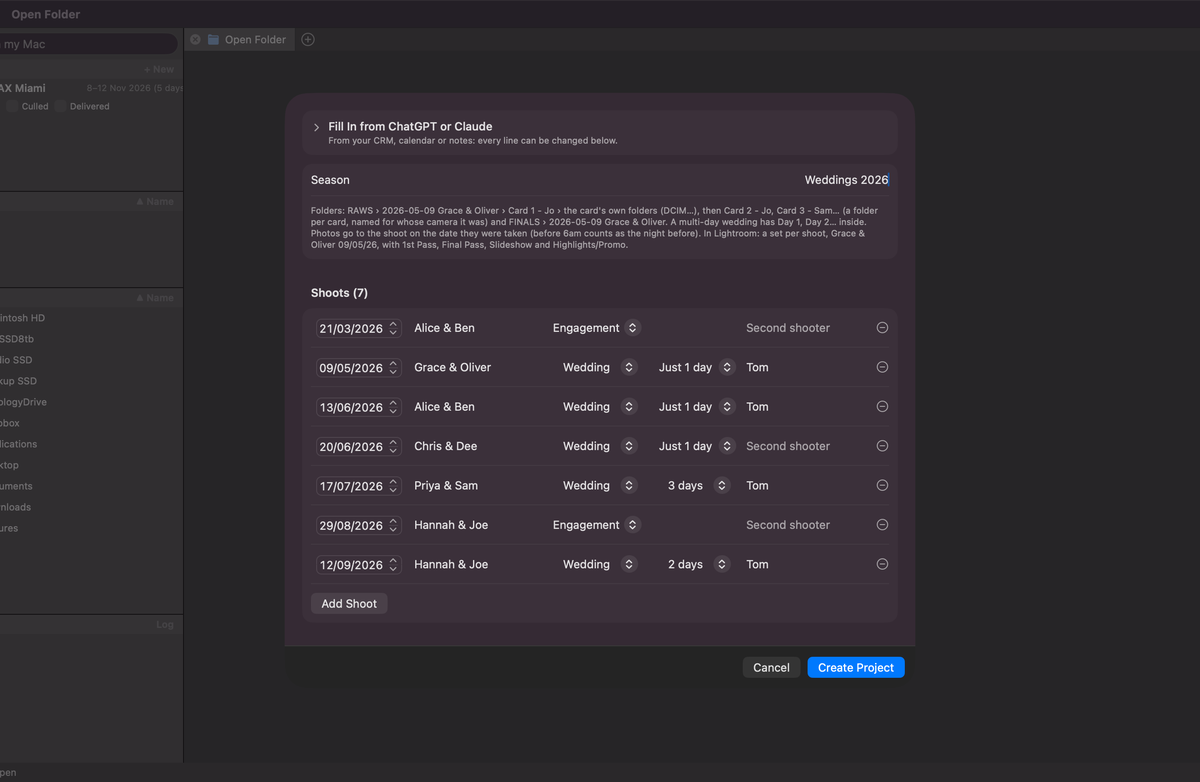
- List the season's shoots. Date, couple, Wedding, Engagement or Other, how many days (just one, or two to five), and the second shooter if there is one. Bookings come in all year, so add more whenever.
- Or fill it in from your bookings. Copy PhotoEngineer's prompt into ChatGPT or Claude with your CRM export, calendar, spreadsheet or notes, and paste the reply back. It reads multi-day weddings too. Check each line and change anything before you press Create.
- Each shoot gets its folders. RAWS › 2026-06-13 Alice & Ben, and a FINALS folder to match, on your drive and your backup. A multi-day wedding has Day 1, Day 2… inside.
- Put the cards in. Every photo goes to the shoot on the date it was taken (anything before 6am counts as the night before), so a card with an engagement shoot and a wedding on it sorts itself. Each card gets its own folder in the couple's folder, Card 1 - Ana, Card 2 - Tom, named for whose camera it was, with the card's DCIM folders inside, just as the camera wrote them.
Then
Organised without trying.
- Every card named for its shooter
- PhotoEngineer knows whose camera is whose by its serial number, so your cards and your second shooter's land in the right wedding as Card 1 - Ana, Card 2 - Tom: easy to credit, check or pay per image.
- The whole day in order
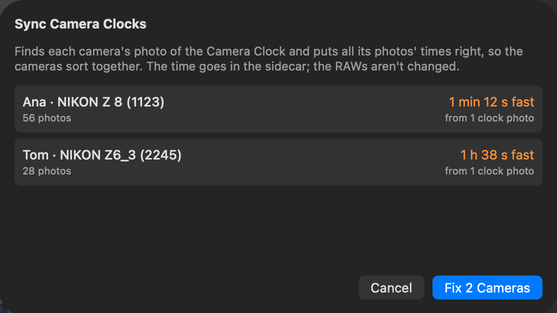
- Two shooters, two or three bodies, and the clocks never agree. Each camera takes one photo of the Camera Clock on your Mac, and every capture time is put right before it's copied. The vows come before the kiss.
- Lightroom sets per couple
- Each shoot gets a collection set in Lightroom Classic, Alice & Ben 13/06/26, holding 1st Pass, Final Pass, Slideshow and Highlights/Promo. Your selects go straight into the couple's 1st Pass.
- Cull fast
- Rate, tag and cull the RAWs with the keys you already know from Photo Mechanic®, then send the picks to Lightroom.
- The cards from last month
- Photos on a card from a date with no shoot on the list stay on the card unless you choose to copy them, so an old job never ends up in this weekend's wedding.
A habit worth having
Don't format a card until it says so.
Keep the cards from a wedding until PhotoEngineer says "safe to format", and the backup drive somewhere other than your Mac's bag. Two copies in two places, both checked: that's the whole job, and PhotoEngineer does it as the cards go in.
Questions
The short answers.
How do I know my photos are really backed up?
Both copies are read back and compared with the card. The card says "safe to format" only when every photo matches in both places.
How should I organise a season?
One wedding project, a folder per shoot by date and couple. Cards go to the right shoot by the date the photos were taken.
Can I bring in my bookings?
Yes: from a CRM export, calendar, spreadsheet or notes, through ChatGPT or Claude. You check every line first.
What about my second shooter?
Each of their cards gets its own folder in the right wedding, named for them, and the Camera Clock lines up both cameras.
Does it work with Lightroom?
Yes. A collection set per shoot, plus stars and tags in sidecars that Lightroom reads on import.
I'm still on Photo Mechanic® 6.
It won't run on Apple silicon Macs from macOS 28. PhotoEngineer uses the same keys. More here.